This post may contain affiliate links. This means if you click on the link and purchase something, I will receive a commission with no extra cost to you. For more information, please read my disclaimer.
I’d had my eye on the reMarkable for a while, but it was at an ecommerce conference that things really clicked. A colleague brought hers along to one of the meetings, and I got a quick chance to have a look at it and pick her brain about it. She couldn’t stop raving about it — and honestly, that was enough for me. I went ahead and bought one to find out what all the hype was about.
If you’ve been following my blog for a while, you’ll know I’m an online girl — I do pretty much everything digitally. But for some odd reason, I’ve always had a thing for a good notepad. I’m really particular about them too; believe it or not, some are genuinely much better than others. So when I came across the reMarkable, I liked the idea of it straight away — to me, it’s essentially a digital notepad, and that ticked a big box.
So what are you actually buying?
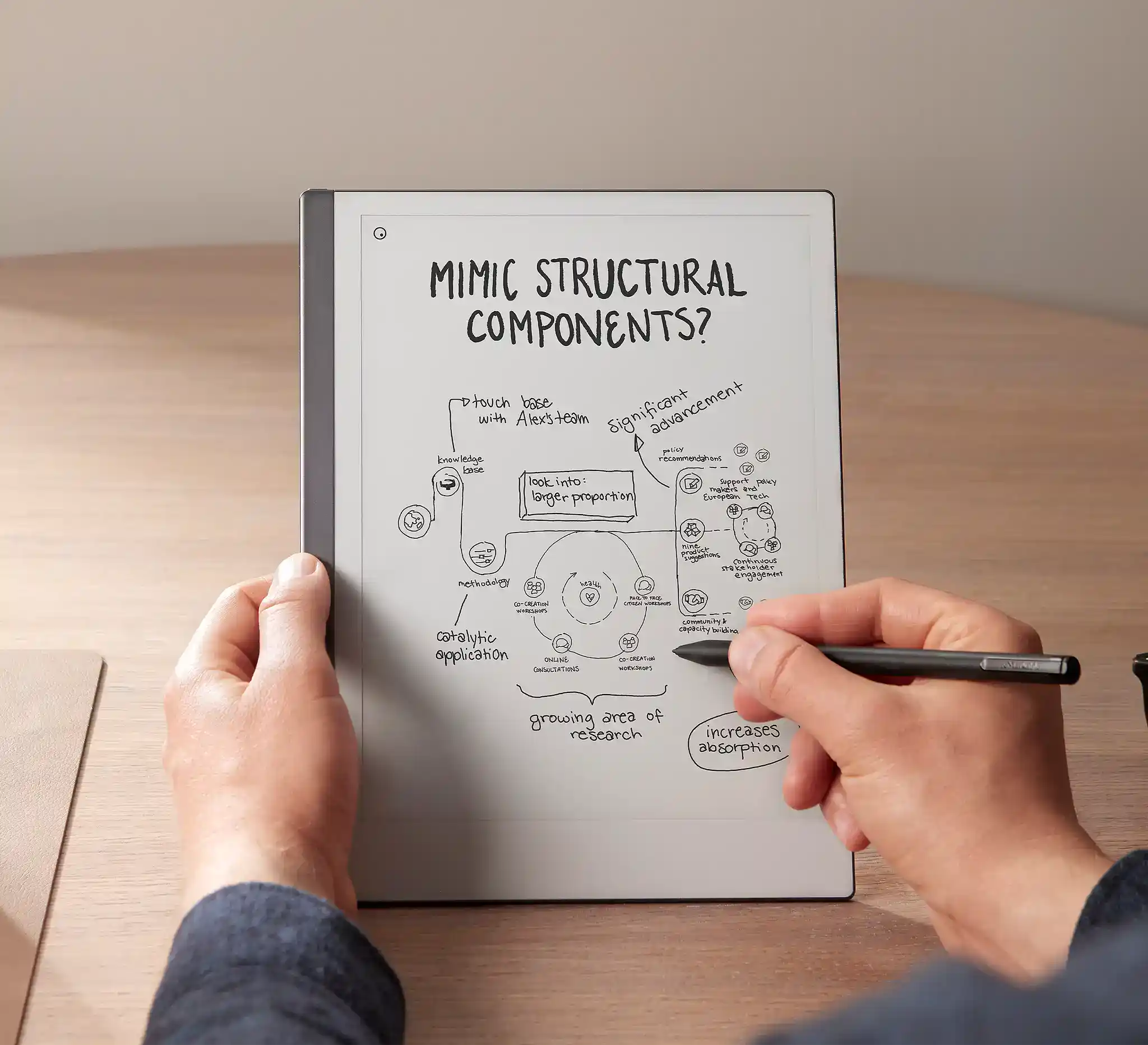
First things first — the reMarkable 2 is not a tablet like an iPad. It’s much closer to a digital notebook. The whole point of it is that it feels like paper when you write on it, and honestly, that’s its biggest selling point. It organises your notes digitally with folders, tags and cloud sync, and it reads and annotates PDFs really well. The battery lasts around two weeks thanks to e-ink technology, which is genuinely impressive.
But — and this is important — there are no apps, no YouTube, no browsing. It’s black and white only, and some cloud features require a subscription for the remarkable tablet. If you’re going in expecting a multipurpose device, you’ll be disappointed. Its real competitor isn’t an iPad — it’s writing on paper. Once I stopped comparing it to smart devices and started thinking of it as a smarter notebook, everything made a lot more sense.

The reMarkable 2 Essentials Bundle — everything you need in one box. Includes the 10.3'' paper tablet, the Marker Plus Pen with built-in eraser, and a stunning black premium leather Book Folio case. It feels as good as it looks. If you're going to get one, go for the bundle — you won't regret it.
What is it actually good for?
It’s brilliant for scribbling, jotting quick notes, shopping lists, journaling your thoughts, and even sketching. But honestly, one of the biggest things for me has been the distraction-free element. The fact that it doesn’t connect to many apps — apart from the essentials — is actually a massive bonus. In recent years I’ve become so distracted by my phone, and I’ve really noticed my focus suffering for it.
I was never that person who would pick up their phone in a meeting, but somewhere along the way that changed. The reMarkable has helped me get back to being present — you remain professional, you stay focused, and your attention is where it should be.
I’ve also found it really useful for documents and PDFs. I’ll be honest — I’m terrible at filing things, so having my PDFs automatically backed up to the cloud is a lifesaver. I can pull something up, annotate it on the go, and know it’s all synced back to my laptop without me having to think about it.
And then there’s the bedside locker situation. I wouldn’t fully call myself a journaller, but what I do know is that having the reMarkable on my bedside locker has genuinely helped my note-taking experience. I pick it up before I go to sleep, jot down a quick to-do list for the morning, and it sets me up to be more productive the next day. The fact that it’s a low-stimulus device with no blue light also means I’m not lying there with a bright screen in my face — and that alone makes a difference.
The one drawback — and this is probably just me — is that I miss being able to flick back through previous notes the way you can with a physical pad. It’s pretty much the only thing a real notepad can do that the reMarkable can’t.
Is it worth it for you?
You’ll likely love it if you take lots of handwritten notes — whether that’s in meetings, studying, or journaling. It’s also great if you get distracted easily on your phone or laptop, because there is genuinely nothing else to do on it. That’s the whole point. As one user put it, the distraction-free experience is king.
On the flip side, skip it if you want apps, multitasking, or entertainment. If you need colour for diagrams, mind maps, or design work, or if you’re mainly typing rather than handwriting, it’s probably not for you. Some users also flag the price versus features, especially once you factor in the subscription.
Quick decision guide
- Student: Great, if you prefer handwriting your notes
- Office worker: Excellent for meetings and planning
- Creative: Good for sketching, but the tools are limited
- Tech-heavy user: Probably going to frustrate you if you’re not accustomed to the remarkable 2 tablet’s writing experience.
How does it compare?
The reMarkable 2 has the best writing feel of the lot, but it has no apps and the lowest flexibility. From what I’ve read, the Kindle Scribe sits in the middle — decent writing feel, limited apps, and medium flexibility — and the Boox tablets offer Android apps and much more flexibility, though apparently the distraction-free experience suffers for it. Price-wise, the reMarkable is at the higher end, with Boox and Kindle Scribe sitting at medium to medium-high for their e-ink tablet offerings. That said, I haven’t personally tried either of these myself, so I can only go on what I’ve researched. If you’d like me to do a hands-on review of either the remarkable tablet or the e-ink tablet, drop a comment below and I’ll add it to the list!
What does it cost?
I bought mine through the reMarkable store on Amazon — you can find the exact bundle I picked up via the link below. I went for the new one and it came with all the bells and whistles, which I was really happy about. I love that it’s the official reMarkable store on Amazon — it just adds an extra layer of trust. And honestly, the convenience and peace of mind that comes with buying through Amazon is hard to beat.
As for where to buy it
I picked mine up through the reMarkable store on Amazon. I just find Amazon so easy, especially with having Prime for purchasing the remarkable tablet. I know it’s secure, and the fact that reMarkable has their own store there made it a no-brainer — saves time at checkout too.
Final thoughts
I really like this purchase — and funnily enough, the main reason isn’t what I originally bought it for. I went in thinking I’d love it because it was this brilliant cross between a notepad and a tablet.
And while that’s still true, my favourite thing about it has turned out to be something I didn’t even see coming — the fact that it’s helped me stay focused and productive.
Because it’s not connected to the apps that distract me most, it’s become this little pocket of calm in what can be a very noisy digital day. It’s funny how it ended up being a bigger win than I ever imagined.